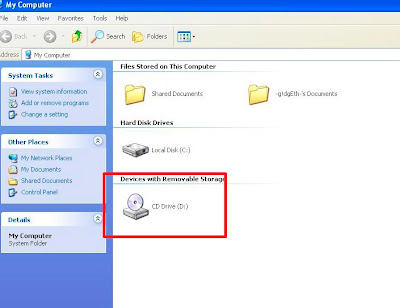
One of my client brought in a Dell Latitude laptop that has a problem with its CD ROM. According to the owner he can't access his CD. The model of his CD Rom is Samsung CD ROM SN-124. Upon inspection, I found out that the device (CD ROM drive) is missing from his My Computer (as you can see on the image below)
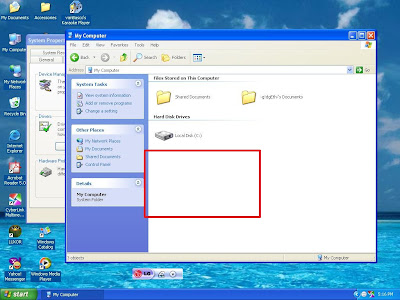
At first, I thought that the problem lies with the connection of the CDROM because I had it disassembled a week before due to display problem. The CD Rom is snap in type, so I easily took it out and back in without hassle. Upon logging in to windows, the problem still persist.
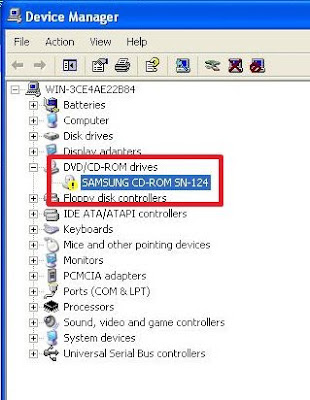
Next, I checked the Device Manager (right-click My Computer, choose Properties, then Hardware and click on Device Manager). As you can see on the picture below, there is a problem with the CD ROM because there is a yellow exclamation mark before it.
I double-click the entry to see the problem and it says:
Windows cannot start this hardware device because its configuration information (in the registry) is incomplete or damaged (code 19)
As the error says, it is related to a registry problem. After a little bit of research, there is an entry on the registry that needs to be deleted in order for the cd rom to work. The culprit is in the registry key:
HKEY_LOCAL_MACHINE\SYSTEM\CurrentControlSet\Control\Class\{4D36E965-E325-11CE-BFC1-08002BE10318}
Here's the automatic fix, just download the file and run it:
Autofix for Windows XP
Autofix for Windows Vista
If the automatic fix don't work you can do it manually. Here are the instructions:
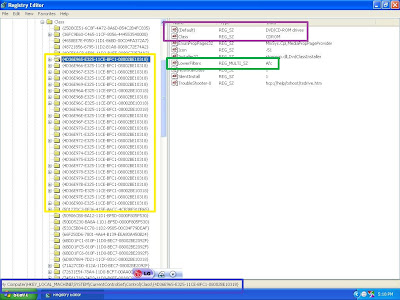
Click START, then RUN and type in REGEDIT. Navigate to the said entry. You will see that there are several entries that has {4D36E965-E325-11CE-BFC1-08002BE10318}. In my case, the first one is for CDROM. Remove the LowerFilters entry. If there is an UpperFilter entry, remove that as well, but in my case it is not necessary.
Here's a screenshot as a guide:
Blue box is the registry address entry.
The Yellow box shows that there are lots of the same entry.
Violet shows that you are on the right entry because it says CDROM
Green box is the entry that you need to delete.
Finally, restart your computer and you can see that your CDROM is now working.
78 comments:
thaaaaaaaaaaaanks =D
nice. it works, really great.
Arigato.
This solution fixed the problem perfectly. Excellent instructions and advice. You shold be praised and revered for your knowledge and expertise. THANKS.
PERFECT SOLUTION
Worked a treat with Vista. Impressed as MS could only suggest to contact them.
Simply renamed filters to disable them.
THANK YOU!!!!!!
Microsoft should publish this as a solution. I've had this same problem happen to 2 different systems in the same week.
Thank You !!! :D
many many many many thanks - i thought i would never get this sorted! cheers
Thank you really helpful, I'm really not great at computers and even I managed it xxx
I love you for posting this...i was mortified that my dvd player wasnt working and you have helped me fix it :D I have to admit i was worried but no you are in fact a life saver. Thanks so much!
Your are a genius. Thank you so much for your help. I tried microsoft advice for a day but it didn't work but your's just solved my problem in lessthan a minute.
you little ripper! worked a charm, thank you so much mate,, called asus and a few other places for a fix and they all said the hardware was damaged, guess NOT!
thank youuuuuu
fixed it a treat. will keep this website in my favourites from now on. thanks.
i dont know where i am suposed to press start from... can someone help
It's the start menu located at the lower left corner of your screen
Thank you so much for taking the time to put up these instructions. The pictures make it so much easier to follow. I had this problem on my brand new Acer Aspire 7735z but following your instructions fixed it. You should be very proud of your public service!
i have the same error in vista os /fllowed the instruction ,
deleted the upper case value , restarted the pc ,it worked
nice tip ,good work mate thanks
roby
worked as a charm!
BIG thanks for help like this!
Hi,
can anybody send me the .reg file to overwrite the existing one? I don't have any admin access to this PC since it is located in the office... I really would like my CD Drive bsck. Please help.
thanks,
Thank you so much this worked and im really happy, have been searching for weeks for a solution to this and you made it so simple.
@ -moniong-
I updated the post. You can try the automatic fix. Download it and run from the affected computer.
Wow,you deserve recognition for your expertise. your solution worked perfectly. Thank you very much.
It worked - Thank you so much!!!!!!
sir, I have exactly same problem but it is in different devices, got webcam... what should i do, is it the same process..? please help me...
Top man.
manual regedit fix worked first time.
Thanks!
That was absolutely perfect! Clear, precise instructions and worked straight away. Thank you so much for your help!
Hi, i'm having the SAME problem BUT with my USB drivers. All of them have the same warning alert. Can u help me?
e-mail: martin.kuffner@hotmail.com
Thks in advanced.
im haveing this trouble with my usb and cd/dvd. i have vista and its a dell. i followed steps but the only thing that came up was stuff that said (default) and tmid_office-pc, attachment path, all the rest say (default) also. what do i do. PLEASE help me. Im not real computer savy. Thank You in advance
jasoncorbett79@yahoo.com
Genius solution, worked a treat on Vista! Thank you SO MUCH!
THANK YOU SO MUCH! I've been fighting with my Pc for 5 days now, i took it apart and thought maybe a wire got loose and nothiong helped, not even microsoft could help.
Did this manually, restarted it, booted up fine
thanks again!!!
Thank you so much, we were really stuck and this solved it instantly!
Great tip, worked a treat. Thanks.
It worked for me also
Thanks thanks
Spent ages trying to sort this, this solved it in minutes, massive thanks man!!
Thanks a lot!! It really Helped me.
Its amazing. you are genious :)
Magic! Thankyou very much
Thanks guy, this solution worked on my HP DV notebook with Windows 7. I spend a lot of time trying many solutions.
I LOVE YOU *___*
very good fix thanks
Excellent fix.
You could do the same for other problem devices/hardware. Like COM ports for example; just go to the registry section listed for COM and LPT port and delete the Lowerfilter and upperfilter if exists.
Thank-you sooo much!
Thanks so much :)
thank you very much! you are awesome!
what if this problem is the same but after finding reg details of cd rom there is no upper or lower filter to remove ?
Well, it's possible that your cdrom is already defective.
Dude! I totally owe you my first born! Too bad the wife and I decided not to have kids. probably better in the end cause if he's anything like me, he'd eat you out of house and home. Anyway, you just saved me from having to return my brand new Toshiba laptop back to bestbuy! Thanks so much. email me your address and I'll send you a dollar! maybe 2 even! I know that's not very much but it's the thought that counts right?
Thank-you so very much. It fixed both the samsung cd-rom sn-124, and the samsung cdrw/dvd sn-308B. 2 of my headaches have gone away. Now, to find a fix for the liberalism that is destroying our once great USA.....
You're better than the SH*TTY microsoft tech support!!!
Thanks buddy, It works perfectly.
Thankyou so much! I was thinking I would have to take my computer in for repairs, which have been so much faf as it's a desktop. But this fixed it straight away. Yay!
Wonderful job. Thanks a lot.
Followed your steps and now the computer is in a constant restart mode. It starts up, tried every mode offered (including safe) and it gets to the Windows Vista page and the restarts again. Any suggestions?
thanks very much - ive tried for 4 hours to fix this problem - then found your instructions, followed them and fixed the problem straight away. You are a star!
s
THANKS
by #~AKT~#
Thank you so much for publishing this solution. You saved me a lot of time and money !
Nothing worked this time...I removed upper & lower filters..uninstalled the dvd device in device manager.. the autofix didn't help either...
Thanks a lot!!!
I don't know your name, but thanks a lot your registry fix works perfectly. One can find this solutions throughout the wb. But this stands out as the Solution with Screenshots which helped immensely.
Gr8 work !
Hey thanks alot. It really worked.
no.Its still not working.Plase give me some other solution
Thx very much, the manual fix works on windows7 also.
i cant seem to find my cd-rom on the registry editor and i hope you could help. im running on windows 7 on an acer aspire 5732Z and cant use the fix it because it keeps getting an error
Thank you, I spent about 6 hrs trying to fix this problem. After I found this website it was about a 2 min fix...thank you. works great!!
THANK YOU! I spend hours looking for a solution to this, then I found your page. I downloaded the automatic fix thing and it worked. Five minutes later I was playing a DVD. Thanks again!
it has just worked for me perfectly with Windows 7, and saved me from having a nervous breakdown. thank you so much!!
Your explanation is so good and clear that I was able to fix the problem easily, thank you so much. I have looked through so many sites but their fix was so complex it made my brain hurt. Turned out iTunes update caused the hassle. Many, many thanks I really am grateful.
Same problem:
Windows cannot start this hardware device because its configuration information (in the registry) is incomplete or damaged. (Code 19)
matshita DVD+-RW UJ8B1
Is there any hot fix for Windows 7?
I have a Lenovo Thinkpad W520 with 24/7 U.S. support which you pay extra for. When this problem happened they took control of my PC and ran the generic fix program I had already run which didn't work. They then pronounced the only way to fix the DVD "code 19" problem was to wipe my PC and reinstall the operating system. On a simple search I found your website and solution which worked. Thank you!
Worked for my friend's Windows XP computer as well - he'd been trying to install some internet software and found his CD rom drives didn't work - and he couldn't get on the net either. We downloaded the Autofix to my laptop, copied it across with a USB stick, ran it on his machine, rebooted and - hey presto! it worked - thanks for posting this solution
Nice it works, thanks
Spent many hours looking for an answer to this problem. Microsoft don't seem to have a clue. Their too simplistic answers never work neither does their fault finding software. Carried instructions out manually and it worked absolutely perfectly................thank you soooooooooooooooooo much!
Brilliant! At last, a solution to the code 19 problem that actually works!
Thought I was never going to get my CD drive back - but now I have - amazing.
By the way, I use Windows 7 Pro and your instructions for Vista and XP worked fine.
Thanks so much, you're a genius! Why Microsoft don't publish this fix is a mystery.
Fantastic!! Have just spent all day searching Dell support and MS help file, without any success at all. Followed these very easy steps and now have my DVD drive back! For info, I'm on Windows 7 (64-bit).
EXCELLENT! I only had the Upper listing, but after I removed it I was good to go. Many thanks! Brent
Big thanks. Combination of a rollback to iTunes 10.7 and an upgrade to IMGBurn burn 2.5.7.0 caused my woes (though iTunes is now unhappy about my DVD burning abilities).
Windows 7 Home Premium 64bit
You are dead set a fucking legend you need a medal I can't tell you how happy I am thank you
Nice of iTunes to fuck us over I think a hacker should send apple a virus or tamper with their software see how much they like it I have a iPhone four iPhone five iPad 3 and iPad mini also two iPods but as of today apple can go and screw themselves I don't like people fucking with my burning capabilities either
Thank you very much, your fixed worked fine - do you know what caused the error in the first place?
Post a Comment