Monday, January 30, 2012

Solution for Error: Enable bi-directional support | Canon Printer iP2770
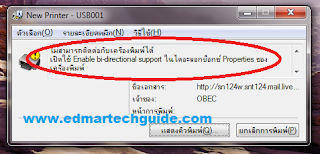
Screenshot of the error message:


Click image to enlarge

Overview:

You try to print on a Canon network printer, it will start printing but it wouldn’t finish. An error will occur saying that you need to Enable bi-directional support on your printer.

Solution 1:

Enable bi-directional support on your printer properties.

How to enable bi-directional support:
  1. On Windows 7 go to Devices and Printers.
  2. Right click on the printer and select Printer properties.


     3. The printer properties window will open. Click on Ports tab at the top.


     4. Put a check mark on Enable bidirectional support.


Most of the time this will work. But in some cases the Enable bidirectional support option is greyed out. If this is the case, it is most likely a driver issue. This error occurs if you are using Windows 7 and then you connect to a Canon printer on a network that is connected to a Windows XP box.

Solution 2:

Go to Canon website and manually download the latest driver for your Canon printer. Install it to the host computer.

After installing the driver, go to printer properties again and double check if the bidirectional support is enabled.


======================================

Does this post helped you in any way? Please consider sharing it to your friends by clicking the buttons below.

Sunday, January 29, 2012

A Scare-tactic Domain Scam

I received this email regarding my "trademark", and it looks like a scam to me.

Subject: About Trademark(Brand Name) Registration-No.2011101332
(It's very urgent, Please transfer this email to your CEO or appropriate person, Thanks)

Dear CEO/Principal,
I'm sorry to disturb you so abruptly.This is Leo Yang.We are Trademark(Brand Name) registration and solution center in shanghai,china, which mainly deal with the global company' s domain name and network brand registration and internet Intellectual property right' s protection in Asia. Currently, we have a pretty important issue need to confirm with your company. On October 13 2011, we received an application formally. One company named "TKM Investment S.A" wanted to applied for the Network Brand "edmartechguide" and some relevant domain names through our body.
Now we are handling this registration, and we found that the keyword of these domain names and network brand is identical with your company's. So we have to confirm with you at two points:
1. If your company consign "TKM Investment S.A"to register these domain names and network brand, we will send application form to them and help them finish the registration at once.
2. If your company have nothing to do with
Now we are handling this registration, and we found that the keyword of these domain names and network brand is identical with your company's. So we have to confirm with you at two points:1. If your company consign "TKM Investment S.A"to register these domain names and network brand, we will send application form to them and help them finish the registration at once.2. If your company have nothing to do with "TKM Investment S.A", they maybe have other purposes to register these domain names and network brand.

We haven't finished the registration of
 We haven't finished the registration of "TKM Investment S.A" yet, and we have postponed this application of this company temporarily already. In order to deal with this issue better, please contact us by telephone or email as soon as possible.
Waiting for your reply ASAP.


Best Regards
Waiting for your reply ASAP.

Best Regards

Leo YangGeneral AdviserExecutive Department
AnHui Office:Phone: 0086-5515120117    
   Fax: 0086-5515123308
Postal Code:230022
Address:Room 807,Building 17,AnGao World Cities,No. 99,WangJiang West Road,HeFei,AnHui Province,China
ShangHai Headquarters:Phone: 0086-2168247379    
   Fax: 0086-2168247376Postal Code:201315Address:Room 1303,No.11,Lane 788,Xiupu Road,Nanhui District,ShangHai,China2011-10-13 


The email looks legit and if you are gullible enough, you will fall from this guy's tactic. I believe if you reply to this email, he will offer you to register domain names bearing your site name with bearing unknown TLDs. I was thinking about sending a reply to confirm my suspicion but I hold myself back thinking that I should use my time to something else. 

A Ridiculous Copyright Claim in Youtube - Music Publishing Rights Collecting Society

Two days ago, I uploaded my first Youtube video to further utilize social media. I thought that it would be a good idea to branch out and start to establish my online brand and presence. It will drive more traffic to my site and add some passive income. So I got out of my comfort zone and record the video and uploaded it to Youtube. 

Guess what, a day after, I got a RIDICULOUS copyright claim on my first Youtube video. The entity that is claiming copyright infringement  is Music Publishing Rights Collecting Society. The claim say that my content type infringe a Musical Composition


Click image to enlarge

I say ridiculous because my video doesn't even have background music to begin with. It's just my voice and a single error wav file from windows. I didn't know that my voice is now considered a musical composition. For those of you who are curious, here's the video:


I started my research and I found out that this same entity flags youtube videos deliberately even though they don't have the copyright on certain music. It looks like they do this to get compensation from Youtube. Nice modus operandi. They have a Facebook Page and there are several hate comments there. This is written on their About Page: "You get the pleasure of posting videos. We get the pleasure of making money from your videos. It's a win-win situation :)". Very classy.

What should you do?

So what should you do if you experience this situation? I disputed the claim and you should too. Even though Youtube said that it will not affect my video, it also say that ads may appear next to my video. I believe this is where Music Publishing Rights Collecting Society makes money. 

Here are the steps to dispute a claim in Youtube:
1. Go to Video Manager of your account and click on the Matched third party content. 

Click image to enlarge

2. At the bottom of the page, click on I want to learn more about the dispute process.

Click image to enlarge

3. On the bottom-right side of the page, click on I have a valid reason to dispute this claim. Take me to the dispute form.
Click image to enlarge

4. Fill out the dispute form. It will be two steps.

Click image to enlarge


Click image to enlarge


5. After that click on Submit Dispute.

Here's a video for those of you who wants to see the steps visually.


Tuesday, January 10, 2012

สิ่งที่ต้องพิจารณาเมื่อซื้อของขวัญจากดอกไม้ออนไลน์

วันนี้คุณสามารถซื้อเกือบทุกอย่างออนไลน์ หากคุณกำลังมองหาของขวัญพิเศษสำหรับคนที่คุณรัก, มีอะไรดีกว่าที่จะส่งของขวัญที่เธอซื้อออนไลน์จากที่เป็น ดอกไม้ไทย ตั้งแต่ประเทศไทยเป็นประเทศที่อุดมไปด้วยธรรมชาติที่สวยงามและมีความหลากหลายมากที่สุดของดอกไม้ในเอเชีย ในบทความนี้เราจะดูที่บางส่วนของปัจจัยที่ต้องนำมาพิจารณาเมื่อคุณกำลังจะซื้อของขวัญดอกไม้ออนไลน์ ประการแรกคุณจะต้องพิจารณาตัวเลือกทั้งหมด คุณจะต้องเปรียบเทียบหลายเว็บไซต์หรือแม้กระทั่งผลิตภัณฑ์ที่จะหาคนที่เหมาะสมกับงบประมาณของคุณ ประการที่สองคุณจะต้องคิดจากมุมมองของผู้รับ ให้แน่ใจว่าคุณมีความคุ้นเคยกับประเภทของที่เธอชื่นชอบของดอกไม้หรือสีที่เธอชื่นชอบ นอกจากนี้เธอจะชอบช่อมือหรือกระเช้าดอกไม้หรือไม่? สุดท้ายคุณจะต้องจำรายละเอียด มันเป็นความคิดที่ดีที่จะตรวจสอบที่หน้าให้บริการลูกค้าเพื่อหาระยะเวลาการส่งมอบและค่าธรรมเนียมที่เกี่ยวข้อง

Monday, January 9, 2012

Signs that You Need Computer Repair

This is a guest post

You don’t automatically visit a computer repair shop if you see your computer as somewhat operable. However, prolonging the visit could actually increase the damage to you system. Here are some warning signs that you already need computer repair:


Dusts and Nicks: 


You should understand that computers are very fragile equipment. If you damage them through dusts, nicks, and other hits, it could end up costing you your precious data. An important piece of the computer may be jarred loose making it inoperable.

Visit a computer repair technician to see if your computer would need some cleaning fixes or tightening if you notice dusts or scratches in the computer.

Slow Boot up speeds: 


A very noticeable warning sign that shows that you would need computer repair is if it does not boot up as fast as it used to. While this may be due to other factors such as too many installed startup programs or an update on the software that suddenly increased computer requirements, it is more often than not a cause of concern.

The computer repair technician would be able to diagnose the problem of slow boot up speeds. They would know if you would need to have hardware components replaced or if you would need to purge your computer because of rogue software such as a virus. They could also determine that you would just need to uninstall some files to help speed up your computer.

Settings that would suddenly change: 

Another warning sign that you should be very wary about is that if there are settings that would suddenly change. For example, if you have a default wall paper or a default homepage and then it would suddenly shift into something else. This is a warning sign because it could mean a couple of things. First off, it may mean that a malware has attacked your computer and is changing settings and homepages to be able to make it spread throughout your system. Another issue that could cause this reaction is that there are some incompatible hardware peripherals that are installed on your computer.

If you would go to a computer repair technician, they would be able to know what are causing the settings to change. If this is a software issue, they would be able to remove the virus and be able to give you back the control of your computer. On the other hand, a hardware issue could be easily fixed by providing you with more compatible hardware.

Charles is an expert Computer Technician and also a contributor of a Computer Repair Company that offers Chorlton Computer Repair Clinic and Manchester Computer Repair for individuals and small businesses.

Sunday, January 8, 2012

Flower Delivery in Thailand

Many of you already know that I am currently in Thailand as an expat. This article is not related in any way about computer repair but I just want to help a friend with his business.

Flowers Thailand is a Thailand based florist offering flower delivery to many cities and rural locations in Thailand. Thailand has recently been hit by heavy flooding but Flowers Thailand are still open for business and offering flower delivery across Thailand.

In Thailand flowers form an integral part of the Buddhist culture most Thai people follow. Flowers are used at wedding and funerals as they are in the west but the Buddhist in Thailand use flowers for many other religious ceremonies and each type of flower has a specific meaning and religious connotations in Thailand.

Flowers Thailand specialize in the overseas Thailand flowers delivery market. Their site is in English and is easy to place an order at any time. Quick delivery is offered to most areas in Thailand and flowers can be delivered within a few hours notice. Many of their customers are students and Thai people who have emigrated to the states. These people often send gifts of flower bouquets and chocolates to their families back home in Thailand.