How to Change Google Language from Thai to English
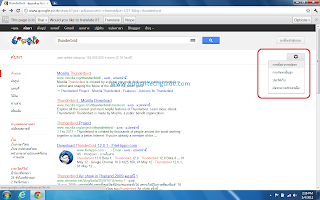
Google giving you results in another language? This is one of the most annoying things when you migrate to another country. I am currently in Thailand and I encountered this problem. The Thai alphabet uses different characters, so it is quite hard to change the settings especially if you don't know how to read Thai script. It is okay if you are just for the holidays but if you are relocating indefinitely, you will find yourself longing for the results you are used to. Here's what you need to do, just follow the steps on the screenshots. First, click the gear icon on the upper right hand side of Google results. Click on the first entry. That is the settings button. Then, on the left side, click on the second entry, it is Pasa. It means Language in Thai. Next, click on the language selection button and choose, Pasa Angkrit . It means English Language. Click on the screenshot for reference. Now click the blue button at the bottom (Save) and that's it. ...