Posts

Showing posts with the label Computer Repair

Beep Codes Meaning - Error Codes

Standard Original IBM POST Error Codes Code Description 1 short beep System is OK 2 short beeps POST Error - error code shown on screen No beep Power supply or system board problem Continuous beep Power supply, system board, or keyboard problem Repeating short beeps Power supply or system board problem 1 long, 1 short beep System board problem 1 long, 2 short beeps Display adapter problem (MDA, CGA) 1 long, 3 short beeps Display adapter problem (EGA) 3 long beeps 3270 keyboard card IBM POST Diagnostic Code Descriptions Code Description 100 - 199 System Board 200 - 299 Memory 300 - 399 Keyboard 400 - 499 Monochrome Display 500 - 599 Colour/Graphics Display 600 - 699 Floppy-disk drive and/or Adapter 700 - 799 Math Coprocessor 900 - 999 Parallel Printer Port 1000 - 1099 Alternate Printer Adapter 1100 - 1299 Asynchronous Communication Device, Adapter, or Port 1300 - 1399 Game Port 1400 - 1499 Colour/Graphics Printer 1500 - 1599 Synchronous Communication Device, Adapter, or Port 1700 - 1799...
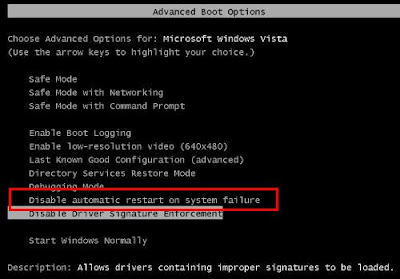
Computer Keeps on Restarting while loading Windows XP

Image
Symptoms: Computer boots like normal, Windows loading screen will appear, after a few seconds, a quick blue screen will appear and then your computer restarts. You can't even read the BSOD information because it just flash in less than a second. This will go on and on and you will be stuck in a loop. Computer will not boot even in safe mode or any other option. Solution: First thing to do is to disable the option that computer automatically restarts when a fatal error/system failure occurs. There is an option inside windows for that, but in this case we can't do that. So what you need to do is to press F8 before the Windows XP logo appears right after the BIOS screen (just like what you do when you want to boot in safe mode). This screen will appear: (this image is from Vista but it's basically the same) What you need to do is choose the option: "Disable automatic restart on system failure" (the one in the red box). After doing that, your computer will restart, an...