Posts

Showing posts with the label Laptop

How to Install Windows 7 on Asus Eee PC 4G / 2G surf
Image
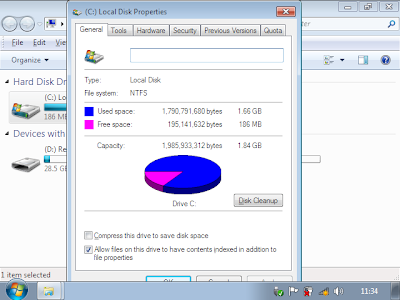
A typical Windows 7 install requires at least 16GB of free storage space, thus making it pretty much impossible to install on netbooks with Garfunkel storage. However, by using Virtual PC, Acronis true image and Vista PE, you can install Windows 7 OS on a device with as-low-as 2GB SSD. After installation, you will be left with mere 186MB of free space which may not enough for installing your apps. That said, it should be fun installing Windows 7 on a Celeron netbook released 2 years ago that came with with 512MB RAM and 2GB flash. Follow these steps: Step 1: Vlite your windows 7 install, you need to make it as small as possible in order to get it to fit on the 2GB hdd, (and even then its too big. More details later about this.) Alternatively use a shrunken version of 7 with your own product key. There are lots of guides on how to Vlite your Windows 7 install so I will not cover them here. Normally the Windows 7 installation process requires much more than 2GB hard ...

How to Extend/Increase Laptop Battery Life - Laptop Battery Tips

Image
How can you improve or maximize your laptop battery life? How can you prolong it's life expectancy of lifespan? These are very common questions for laptop/notebook user. Laptop / Notebook batteries are actually categorized as "consumables". They are expected to wear out in time. So, while you can extend their life expectancy, accept the fact that your laptop battery won't last forever, no matter what even when you're not using it. So, it is not a good idea to buy an extra battery now thinking that you can store it and use it once the original battery has degraded. It's better for laptop batteries to be used, rather than sitting on a shelve. So if you use a laptop, don't plugged it in all the time. Let it drain to about 40% and then recharge. Laptop battery lifespan or life expectancy Laptop batteries are Lithium-Ion or Li-ion. Lithium-Ion laptop batteries are rated for a useful life of at least around 400 life cycles. A charge cycle occurs when 1...

Redfox Navigator e12kt Windows XP Driver | WinXP

This post is for those of you that are looking for the Drivers of Redfox Navigator E12KT laptop . Drivers for this laptop model are hard to get because it is actually a rebranded laptop. This model is actually Twinhead E12KT AKA Efio! 12K . Here are the specifications: cpu:Mobile AMD Sempron(tm) Processor 3100+ RAM: 512 MB HDD: TOSHIBA MK6025GAS (60GB) optical drive: QSI DVD+/-RW SDW-082K display: 1024x768 vga: extern analog grafikcard: VIA Technologies, Inc. S3 Unichrome Pro VGA Adapter wlan: RaLink RT2500 802.11g Cardbus/mini-PCI lan: VIA Technologies, Inc. VT6102 [Rhine-II](rev 74) pcmcia: ENE Technology Inc CB1410 Cardbus Controller (rev 01) sound: VIA Technologies, Inc. VT8233/A/8235/8237 AC97 Audio Controller (rev 50) modem: VIA Technologies, Inc. AC'97 Modem Controller (rev 80) usb: VIA Technologies sd-cardreader: winbond Driver download link for Redfox Navigator e12kt and other Twinhead products: CLICK HERE

Sotec Winbook WV2150 - Audio and Video Driver WinXP/Vista

Image
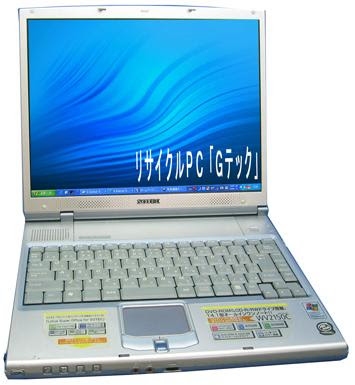
Here's a little info for those people looking for drivers of Sotec Winbook WV2150. I wish this will help those people having problems with the correct drivers because they can't identified the correct name/manufacturer/model of the hardware. I recently installed a new hard drive into a Sotec Winbook WV2150. After doing a fresh install of Windows XP, the the audio and video card drivers are missing. I used driverforge along with driver packs to install the missing drivers, but driverforge or maybe Windows itself incorrectly identified the sound card as C-Media AC'97. The device could not start according to the device manager, so the sounds don't work. The VGA was fine though, it is Sis 650_651_M650_M652_740. After some research, I found out that he correct sound card/audio driver should be Realtek AC'97 Audio Driver. Here's a screenshot of the device manager of a working Sotec Winbook WV2150: Audio/Sound Card: Realtek AC'97 Audio Video/VGA: Sis 650...

How to get rid of "It now now safe to turn off your computer" screen in Windows 2000/Win2k

Image
Laptop Model: IBM Thinkpad iSeries/ i Series 1400 (2611-452) OS/Operating System: Windows 2000 / Win2k Processor: Celeron Memory/RAM: 64 MB PROBLEM: After changing the hard disk drive of an IBM Thinkpad iSeries laptop and doing a reformat, I encountered this fairly common problem. When I turn the laptop off, instead of automatically powering down, it displays the message: It is now safe to turn off your computer This thing was common on the days of Windows 98 and AT type computer. But in laptops, this should not happen (also on ATX-type computer). SOLUTION: 1. Go to START MENU > SETTINGS > CONTROL PANEL 2. On C ONTROL PANEL double-click on POWER OPTIONS 3. Click on APM tab and put a check on Enable Advanced Power Management Support And that's it.

Buying a laptop? Some cheap options

Image
Planning to buy a laptop, but not sure if to spare the cash in the present uncertain economic scenario? Here's how to have a laptop without taxing your pocket. Welcome to the emerging breed of laptops, called Netbooks, these mini-laptops offer slimmer looks, smart functionalities and carry a small price tag. The category initially lead by Taiwan-based Asus, today has been joined by all PC majors including Acer, Dell and HP. Also, called Internet books, they are ideal devices for Web browsing, emailing, chatting, designing and gaming. Here are some recent NetBooks launches to guide your decision. Acer Aspire One D150 Acer recently launched a 10.1-inch Aspire One D150 Netbook in India with WSVGA LCD display featuring Acer CrystalBrite technology. The 10-inch version offers 1024 x 600 pixels as the native resolution. The notebook has a multi-touch trackpad and a six-cell Li-ion battery. Equipped with 1.6GHz Intel Atom N270 processor, Aspire One D150 packs Intel 945GSE chipset that fea...