Posts

Showing posts with the label iPhone

How to Backup iPhone Safari Bookmarks On Your Computer

Image
This is a tutorial on how can you backup all your iPhone safari bookmarks on your computer browser including Safari or Internet Explorer,It very easy to do that,please look the following procedure. 1. Connect your iPhone with data cable and run iTunes 2. Now, select your iPhone and click the Info tab, select Sync Bookmarks With Safari or Internet Explorer 3. Make sure that Bookmarks should be unchecked under Advanced 4. Click Apply button after setting all these options, and it will start syncing your iPhone safari bookmarks 5. After some time it will ask you to allow changes due to some of the bookmarks copied from iPhone Safari Browser, click allow to let it proceed and copy the iPhone safari bookmarks to your computer browser. That’s it, After sync is complete you will see your iPhone safari bookmarks in the respective browsers you choose.
The 5 Best iPhone Apps You’ve Never Heard Of

Sorting through the thousands, and I do mean thousands, of apps available in the app store and separating the crap from the truely useful can prove to be a difficult task. And there are plenty of blogs and websites out there telling you which iPhone apps are in the top 10 but what about the great apps that haven’t been brought to light because they’ve remained buried among the hundreds and hundreds of apps that make farting sounds. That’s why I’ve created this guide - I did all of the leg work for you so all you have to do is download and enjoy. You can use a minute of all that extra time you now have to tell me what your favorite app is in the comments. So, here they are, in no particular order: Spreadsheet: I think the name of this app is more than adequate at explaining what it does. What else can I say? I’ve been hearing for over a year now that Dataviz, the makers of Documents to Go, the popular word/excel/powerpoint viewer and editor available on BlackBerry devices, was working ...

25 (Most Wanted) Tips For IPhone 3G

Image
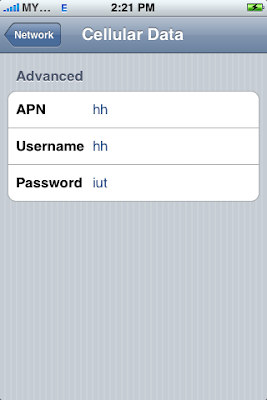
We all know that the handy user experience of iPhone is one of the selling point. But not so many people do realize that there are several shortcuts, tips and tricks available on the iPhone which able to make life much easier. We believe every single iPhone users would like to know all of the tips and tricks for every feature of iPhone. In fact, if you dig and explore a little deeper, you will know that you can actually do a lot more on your iPhone. With these lesser-known goodies, you can easily get the most out of your iPhone. This week, we’ve collected some really amazing tips from Web and our own experiences to present you 25 most wanted tips for iPhone 3G. Full list after jump! 1) How To Disable IPhone 3G GPRS Or Edge Connection Tap "Setting - General - Network - Cellular Data Network". In the “APN, Username and Password" field, simply type in some words so iPhone will not pass the correct values to service providers. Restart your iPhone if necessary. 2) How To Set ...