Posts

Showing posts with the label Anti-Virus

Solution: Can't Browse the Internet After Installing / Upgrading AVG Anti-virus | How to Remove AVG Miniport

Image
Problem: Can't browse the Internet after installing or upgrading AVG 9.0 Symptoms: In some system, Local Area Connection (LAN) says the cable is unplugged even though it is plugged in. IPConfig command returns nothing. In the Device Manager under Network Adapters , there are several entries of AVG miniport driver and these entries have yellow exclamation mark . ( "WLAN Miniport (IP) - AVG miniport driver") Properties shows: "Windows cannot start this hardware device because its configuration information (in the registry) is incomplete or damaged. (Code 19) Click Troubleshoot to start the troubleshooter for this device." You cannot uninstall the AVG miniport driver entries (remove or delete). Update and rollback doesn't work either. System Restore will not help. Screenshot: Culprit : The devices appear because they are called up by registry entries which should have been deleted as part of the AVG uninstallation Solution: U...
Solved: Avast Antivirus Installation Error 3

Image
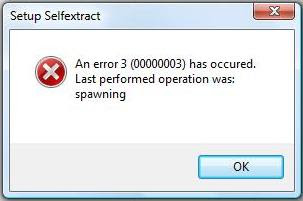
Problem: When you try to install Avast Antivirus, this error occurs: Setup Selfextract An error 3 (00000003) has occured. Last performed operation was: spawning Screenshot : Cause: This error occurs when you try to install a new Avast installation in a computer that has a corrupted installation of Avast Antivirus. Solution: 1. Download Avast Uninstall Tool/Utility . 2. Start Windows in Safe Mode 3. Run the uninstall utility (aswclear.exe) Please note: If you installed Avast antivirus in a different folder than the default, browse for it. Be careful though because the content of any folder you choose will be deleted. 4. Click REMOVE 5. Restart your computer. 6. You can now reinstall avast antivirus.

How to Get License Key for Avast 4 Home Edition

Image
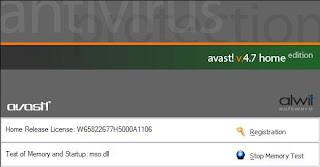
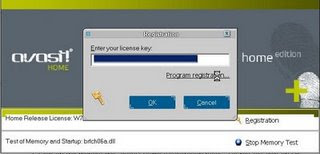
Click on the avast! icon on your desktop. Click on Registration (second line from the bottom) and you should see this: Click on Program Registration. Your browser will come up with the avast registration web page. Register either as a new user (if you never had a license key; check your My Documents folder!) or as a registered user who lost the license key. When you get the email with the license key copy/paste the key into the highlighted field under "Enter your License Key" and click on OK.

How to Get Rid of Avira's Nag Screen

After each update Avira puts up a nag screen, asking you to upgrade to the Premium or paid version. If you don’t want to see this screen follow these steps to disable it. This applies to Vista Ultimate and the new Avira 9.0.0.386: 1) Start-> Run. Type secpol.msc to open the Local Security Policy window. 2) Click on Software Restriction Policy-> Additional Rules. 3) Right-click Additional Rules-> New path rule. 4) Click Browse and navigate to c:\Program files\Avira\Antivir Desktop and select avnotify.exe. Set the security level to Disallowed-> Apply-> OK. You won’t see the nag screen again during future updates. If secpol.msc won't run on your machine, the easiest way to disable the Avira Nag Screen is to Open regedit and navigate to: [HKEY_LOCAL_MACHINE\SOFTWARE\Microsoft\Windows\CurrentVersion\Run] In the right pane double-click avgnt...

Most Effective Tool to Remove Brontok and/or Sohanad Virus

Image
If you experience the dreaded Brontok infestation and ask how to remove it on some forums, many will tell you that the only solution is reformatting your hard drive. Yeah, right. As if formatting your hard is as simple as they said. Windows installation per se is easy, it will only take you 30-45 minutes on average, but the time that you will spend on installing your favorite programs, games, applications, etc. is no joke. You will spend plenty of precious hours for these things. There was a time when someone asked my help to remove this virus from her LANshop computers. I have tried every single Brontok remover out there that i can found, but it still keeps on coming back. Maybe because, as time goes by, virus maker find a way to alter its code and make some variants. So, effective removal instruction for now, will not be as effective tomorrow. I was already hopeless. I also tried 3 well known antivirus to no avail, you can easily found yourself on an endless loop, while the antivirus...