Posts

Solution for Error: Enable bi-directional support | Canon Printer iP2770
Image
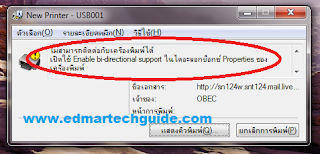
Screenshot of the error message: Click image to enlarge Overview: You try to print on a Canon network printer, it will start printing but it wouldn’t finish. An error will occur saying that you need to Enable bi-directional support on your printer. Solution 1: Enable bi-directional support on your printer properties. How to enable bi-directional support: On Windows 7 go to Devices and Printers. Right click on the printer and select Printer properties.      3. The printer properties window will open. Click on Ports tab at the top.      4. Put a check mark on Enable bidirectional support. Most of the time this will work. But in some cases the Enable bidirectional support option is greyed out. If this is the case, it is most likely a driver issue. This error occurs if you are using Windows 7 and then you connect to a Canon printer on a network that is connected to a Windows XP box. Solution 2: ...

A Scare-tactic Domain Scam

I received this email regarding my "trademark", and it looks like a scam to me. Subject: About Trademark(Brand Name) Registration-No.2011101332 (It's very urgent, Please transfer this email to your CEO or appropriate person, Thanks) Dear CEO/Principal, I'm sorry to disturb you so abruptly. This is Leo Yang.We are Trademark(Brand Name) registration and solution center in shanghai,china, which mainly deal with the global company' s domain name and network brand registration and internet Intellectual property right' s protection in Asia. Currently, we have a pretty important issue need to confirm with your company.   On October 13 2011, we received an application formally. One company named "TKM Investment S.A" wanted to applied for the Network Brand "edmartechguide" and some relevant domain names through our body. Now we are handling this registration, and we found that the keyword of these domain names and network brand is ide...

A Ridiculous Copyright Claim in Youtube - Music Publishing Rights Collecting Society

Image
Two days ago, I uploaded my first Youtube video to further utilize social media. I thought that it would be a good idea to branch out and start to establish my online brand and presence. It will drive more traffic to my site and add some passive income. So I got out of my comfort zone and record the video and uploaded it to Youtube.  Guess what, a day after, I got a RIDICULOUS copyright claim on my first Youtube video. The entity that is claiming copyright infringement  is Music Publishing Rights Collecting Society . The claim say that my content type infringe a Musical Composition .  Click image to enlarge I say ridiculous because my video doesn't even have background music to begin with. It's just my voice and a single error wav file from windows. I didn't know that my voice is now considered a musical composition. For those of you who are curious, here's the video: I started my research and I found out that this same entity flags youtube...

Solution: Can't Watch Youtube Videos on Google Chrome

For some reason, I cannot watch youtube videos using Google Chrome earlier today. I can watch embedded videos though but when you go directly in Youtube a 500 Internal Server Error occur. Youtube videos are playing fine Firefox and Internet Explorer so this is a problem with Chrome. I tried disabling hardware acceleration in Flash but it didn't work. I tried manually installing adobe flash player but it's impossible since Google Chrome updates Flash automatically whenever there's a new update. The Culprit?  Cookies Try deleting all cookies from Youtube. Click the wrench icon in the upper right portion of Google Chrome. Then click Options . Click Under the Hood on the left side. Click Content Settings then All Cookies and Site Data. Type Youtube in the Search cookies field. Then click Remove All after the search. After this you will be able to watch youtube videos again. 500 Internal Server Error Sorry, something went wrong. A team of highly trained monkeys has...

A Tale of a Hacked Email Account

Image
Yes, my main email account was hacked. I don't know for how long it lasted but I'm very thankful that no serious damage was done (to my knowledge at least). I experienced the frustration of changing my passwords from different websites. I do use different passwords in different sites but this particular password is the one I use for my paypal account and other important accounts on the web. The Story I was out the whole day last Sunday and upon arriving home I opened my laptop and check my email. I use Thunderbird for my emails and I notice one email about successful resetting of Admin password in one of my wordpress site. This raised a red flag for me because I never initiated any password reset. If this is just a request, I will not bother but this one is a successful reset. I immediately went to the site and as expected, I cannot log in using my password. I ask for a password reset and was able to gain access to the site. Good thing that I assigned a different emai...

I Just Switched to Linux Mint. Goodbye Windows 7.

Image
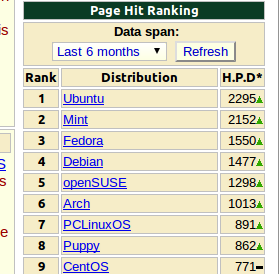
After years of thinking about it, I finally dumped Windows and installed Linux on my laptop (Lenovo Y410). In fact, I'm posting this from my Mint-powered laptop. I choose Linux Mint because of the good reviews I read prior to deciding what my chosen distro will be. Basically it is a fine-tuned Ubuntu. I was surprised to see that Mint is closing in on Ubuntu in terms of popularity according to Distrowatch.com's page hit ranking. The first time I looked at Mint (version 8), it is way behind Ubuntu. But now it is in 2nd place and it looks like it will overtake Ubuntu sooner or later. Why just now? Like I said, this is a plan that started brewing eons of years ago. I'm one of the proponents of Linux. I really  like to get rid of all Microsoft products in my system. But my job as a computer technician makes it impossible. Recent developments with my job is the indirect reason why I just switched now. I recently relocated here in Thailand (Bangkok). I arrived here Janua...

How to Display Adsense Ads Below the Blog Title in Blogger

Image
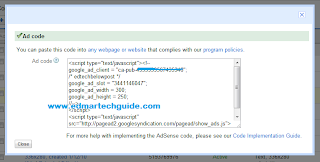
As you can see, I'm monetizing this blog by using Google Adsense. I get paid every time someone clicks an ad. The most effective ad placement for me is the one located under the blog title. I will post here the steps if you want to implement this on your site. Create your desired adsense ads and copy the code. Adsense Code 2. You will need to convert the code because blogger will not accept it. Use postable for that. A very friendly app written by Elliot Swan. Paste it in the box and click on "make it friendly". Don't close it yet, you will need the code later. postable - very handy app 3. Go to Blogger dashboard > click on Design > the Edit HTML. Put a check mark on Expand Widget Templates and search for  .  To do it faster, click on Ctrl+F on your keyboard and find it. 4. Now paste the code from postable above . If you want your adsense ad to float along with the post body, add this code before and after your adsense code:  Put your adse...