How to Uninstall Deep Freeze with or without the password
Deep freeze is an excellent program is you have a computer shop / internet cafe and you don't want the headache and hassle of reformatting your PC everytime your computer encounter a serious problem. But it can also be a source of your problem if you already want to uninstall it or worse, you don't know/forgot the password.
Yesterday, somebody called me up and asked if i can uninstall deep freeze without knowing the password because his former technician went on AWOL. Fortunately, I do. It saved him a lot of time because everyone he asked told him that the only answer to his problem is by formatting his hard drive. I will post here two methods, you can use the first one if you know the password and you just don't know how to disable or uninstall deep freeze. The second one is for those people who forgot the password of their DF program.
First method from DeepFreeze FAQ:
Second method (if you don't know the password) is to use a program called Deep Unfreezer v1.6To uninstall the software Deep Freeze must first be disabled and then uninstalled.
To disable Deep Freeze:
- Hold down the shift key and double-click on the Deep Freeze icon. Alternatively, you can press Crtl-Alt-Shift-F6. You should now see a password dialog.
- Enter your password and click OK. If you have not yet entered a password you should be able to click OK without entering anything. You should now see a dialog with boot options.
- Select "Boot thawed" and click OK. This will disable Deep Freeze on the next reboot.
- Reboot your machine. After the machine reboots you are ready to uninstall Deep Freeze.
To uninstall:
- Locate the installation file you used to install Deep Freeze to this machine. By default the name of this file is called "DF5Std.exe" for versions 5.X and "DF6Std.exe" for versions 6.X.
- Run the installation file (DF5Std.exe or DF6Std.exe).
- Select the option to "Uninstall"
- The software should uninstall and reboot the machine. When the machine reboots, Deep Freeze should be uninstalled.
Warning: Use the program at your own risk. Use only as a last resort. I take no responsibility or the author to any damage it can produce. Please backup your important files /registry as necessary.
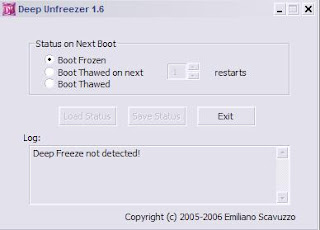
Download location
Any suggestion, question or violent reaction? Feel free to leave a comment.
View Random Post

Comments
my email:jessa.tenio@yahoo.com
or jessatenio@yahoo.com
aside from not seeing the deep freeze tray icon and ctrl+alt+shift+f6, reformatting the hard drive also does not work for me.
since reformatting often requires me to reboot, everything goes to its deep freeze state after one reboot during formatting.
btw i am using df6 and installed it using windows recommended settings since i am using windows 7.
Give me suggetion
Ashish Barad
I am a new user, with admin rights at home. My system is using windows xp sp2, intel dual core 2.80Ghz processor, 1.5G RAM, and 160Gb seagates hard drive. I download Deep freeze v 7.22 standard from the faronics.com. I therefore entered the license key, before carry out installation.
Upon installation of the Faronics Deep Freeze v 7.22 (7.22.020.3453 to be exact), my computer restarts. It is the successful installation i assumed, as i will need to click "finish", to proceed.
Then, immediately the computer restarts successfully. However i couldn't find a single faronics icon , any one, neither from the tab next to clock nor in the control panel. In short i cannot access deep freeze at all before i even could set the password , or to do any configuration settings to it. Worse still, i cannot THAW it. The computer is set to frozen state , WHICH CLEAR EVERY CHANGES MADE. I cannot update anti virus software. It seems to be permanent now. Neither can i uninstall it because it is in frozen state, saying that i should disable it before first.
I also can't use Windows xp's system restore to erase it, because it goes back to the the current state always.
pLEASE address the solutions to me as soon as possible, or tell me where can i get help. I have search the FAQ section but to no avail.
Faronics support reprensentatives told me that my deep freeze is corrupted. Here's my technical info:
I have search in the respective faronics folder only to find this...
1)DFServe.exe( as for 7.22.020.3453 standard version)
Hence i cannot find the 1) Frzstate2k.exe, 2) DFMonitor.exe files]
Tell you what, i don't have a bear icon(deep freeze) at the bottom right of my windows screen.
So , I believe it is corrupted.What must i do to restore everything back to its original, without having to reformat the hard drive...
Thank you for your time.
ANY SOLUTION TO THIS?
try here on my blog!
7.....my problem is that i accidentally on the deep freeze while in a windows update and when i restarted it then going to the welcome screen and its say "Windows Configuration" Please Do Not Turn Off Computer and when its 100% its reboot always i can't go to the desktop because i accidentally on the deepfreeze
7.....my problem is that i accidentally on the deep freeze while in a windows update and when i restarted it then going to the welcome screen and its say "Windows Configuration" Please Do Not Turn Off Computer and when its 100% its reboot always i can't go to the desktop because i accidentally on the deepfreeze
email me please kenneth_llego18@yahoo.com
inorder to uninstall deepfreeze just go to safemode by pressing f8 and select regedit in run and then select HKEY_LOCAL_MACHINE, and select SOFTWARE and in that you could see deepfreeze6.0 so right click on it and delete.This operation needs Administrator rights so log in as an administrator and reboot the system once you delete.
This should uninstall deepfreeze permanently.
any queries contact +919704883816
thank you advanch
i cannot see the icon below.. i open c/program/faronics/deepfreeze then i tried to double click the icon their is still no response...:C i tried your uninstaller...nothing happens... i tried to delete still deep freeze is installed... i noticed that in c/windows/systen32/drivers/dfs.... still installed...what will i do????
it does not work by pressing clt+shift+alt+f6
please send answers in hhrk71@yahoo .com id
What will happen if Deep Freeze is on and i will uninstall a program, like a huge size game, will it restore the program after reboot? thanks
password: blackbloood dont try to change may password is wasting your time
after download the anti dreep freeze .. install it then uninstall ... your problems hass been solve by me :) ^_^
password: blackbloood dont try to change may password is wasting your time
after download the anti dreep freeze .. install it then uninstall ... your problems hass been solve by me :) ^_^ but before you do this scan first to virus removal tools heres the download link:
http://www.kaspersky.com/antivirus-removal-tool?form=1 maybe your computer is affecting the virus called SALITY VIRUS so scan first :)