Posts

"An unexpected error occurred" - Airport Extreme Base Station Error Fix

TLDR fix: Use a LAN cable to connect to your Airport Express Base Station rather than connecting through WiFi. Long and winded details: I bought a secondhand Airport Extreme Base Station a while ago and I just decided to set it up tonight. I ran into this error when I ran the AirPort Utility on my Macbook Air: "An unexpected error occurred". No clue, no nothing. It just refused to finish the setup. Here's my current setup: 1. PLDT Home Fibr with its own WiFi Router/Modem (FiberHome GPON ONU Model: AN5506-04) 2. Airport Extreme Base Station Model 1408 (5th gen I believe) 3. One of the Airport Extreme LAN port is connected to one of the LAN ports of the PLDT modem 4. Macbook Air running macOS Mojave 10.14.4 Things I did / suspected to be causing the issue: 1. Aftermarket power brick of the Base Station. I'm using a 12V 1.5A output instead of 1.8A required by the Base Station. But it's working fine until now so I guess that's okay. 2. I thought it...
How to Force your Mac to Show the Log-in Page of a Public WiFi Hotspot

Image
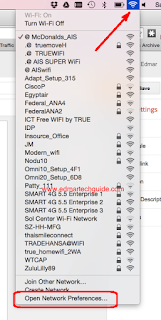
Most public Wifi hotspots requires you to sign in and register first using the supplied password. But if you're using a Mac this could be a problem because most of the time it will not show log-in page. I recently experienced this when I went to Bangkok and had breakfast in McDonalds. They offer free AIS WiFi internet for 45 minutes, but the problem was the log-in page doesn't show even though I was connected. Tried different browsers (Chrome, Safari, and Firefox) but still no dice. This problem is due to the DNS setting of you computer. Basically, you need to delete the current DNS stored on your computer so it will force to get a new one. To fix this problem, follow these steps: 1. Connect to the public WiFi hotspot 2. Click on the WiFi icon on the top right side of your desktop 3. Click Open Network Preferences 4. Click Advanced 5. Go to DNS tab 6. Under DNS Servers, click on the first set of numbers (there are usually two on the list) 7. Delete the entry by c...

How to Change Google Language from Thai to English

Image
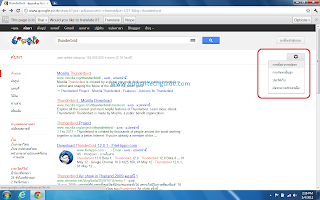
Google giving you results in another language? This is one of the most annoying things when you migrate to another country. I am currently in Thailand and I encountered this problem. The Thai alphabet uses different characters, so it is quite hard to change the settings especially if you don't know how to read Thai script. It is okay if you are just for the holidays but if you are relocating indefinitely, you will find yourself longing for the results you are used to. Here's what you need to do, just follow the steps on the screenshots. First, click the gear icon on the upper right hand side of Google results. Click on the first entry. That is the settings button. Then, on the left side, click on the second entry, it is Pasa. It means Language in Thai. Next, click on the language selection button and choose, Pasa Angkrit . It means English Language. Click on the screenshot for reference. Now click the blue button at the bottom (Save) and that's it. ...

Solved: Prefetching is not allowed due to the various privacy issues that arise

Image
Click image to enlarge I encountered this error while browsing new posts in technibble.com. I can't go to the second page of the result page. At first, I thought that it was because of a Google Chrome extension that I am using (Fastest Chrome). It auto-load the second page of a page you're browsing. But after researching, it seems that it was because I am behind a proxy here at my workplace. Refreshing the browser didn't work. Solution: Just press  Ctrl + F5  to delete cookie before refreshing the page. ------------------------------------------- Does this post helped you in any way? Please consider sharing it to your friends by clicking the buttons below.

Solved: iertutil.dll was not found error

After so many years, Microsoft started to phase out IE6 and started rolling out Internet Explorer 8 update . But many people experienced a problem after the compulsory IE8 windows update. Their Windows computers won't boot, instead it shows this error: bcmwltry.exe/explorer.exe - Unable to Locate Component This application has failed to start because iertutil.dll was not found. Re-installing the application may fix this problem.  The ordinal 681 could not be located in the dynamic link library iertutil.dll This error is caused by an improper installation of Internet Explorer. You can try this solution to fix this problem: 1. Press CTRL + ALT + DEL when you see the error. 2. With the Task Manager running, click File then New Task , type CMD then press enter. 3. A black window will open, this is the command prompt. Type these commands (press enter after each command): ren c:\windows\system32\dllcache\iertutil.dll iertutil.old copy c:\windows\system32\...

Dropbox error message: This file does not have a program associated with it for performing this action

Image
Actually this is not a Dropbox error message, rather Windows 7 autoplay problem. But I found out that it is related to Dropbox. There is an ongoing beta test with Dropbox right now and if you join the beta testing program you can have a chance to get 4.5 Gb more space. I tried it and it worked for some of my device but it didn't work for some. It worked for my point and shoot cameras but it didn't work with my old SLR (Canon Digital Rebel) and my smartphone (Nokia 5800 XM) connected via bluetooth. Then I tried the USB / flash drive technique but this error message appear every time I plug the device and choose to sync the pictures via Dropbox: This file does not have a program associated with it for performing this action. Please install a program or, if one is already installed, create an association in the Default Programs control panel. Click photo to enlarge I tried several things to to fix the problem to no avail. I tried different settings in Default Progra...

Why is my Google Analytics Site Search Overview blank?

Image
Google Analytics is one of the most important tools if you have a website. You can analyze your web traffic and easily make changes depending on the data presented on it. One of Google Analytics feature that I always check is the site search overview. Why? Because it gives me ideas on what topic I should right next on my website. I installed Google site search on my blog not just to add additional income from Google Adsense but to know what my readers are searching as well. If they’re searching from it on my site, it means that they are interested in that topic. Where can I see the searched terms or keywords on Google Analytics? In Google Analytics, go to Standard Reporting . On the left sid e click on Content , then Site Search > Overview . Click to enlarge But what if your Google Analytics site search is blank just like in the screenshot above? It means that Site Search tracking is disabled on your GA account. I first noticed this when I switched to the...

Solution for Error: Enable bi-directional support | Canon Printer iP2770

Image
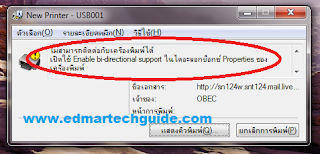
Screenshot of the error message: Click image to enlarge Overview: You try to print on a Canon network printer, it will start printing but it wouldn’t finish. An error will occur saying that you need to Enable bi-directional support on your printer. Solution 1: Enable bi-directional support on your printer properties. How to enable bi-directional support: On Windows 7 go to Devices and Printers. Right click on the printer and select Printer properties.      3. The printer properties window will open. Click on Ports tab at the top.      4. Put a check mark on Enable bidirectional support. Most of the time this will work. But in some cases the Enable bidirectional support option is greyed out. If this is the case, it is most likely a driver issue. This error occurs if you are using Windows 7 and then you connect to a Canon printer on a network that is connected to a Windows XP box. Solution 2: ...

A Scare-tactic Domain Scam

I received this email regarding my "trademark", and it looks like a scam to me. Subject: About Trademark(Brand Name) Registration-No.2011101332 (It's very urgent, Please transfer this email to your CEO or appropriate person, Thanks) Dear CEO/Principal, I'm sorry to disturb you so abruptly. This is Leo Yang.We are Trademark(Brand Name) registration and solution center in shanghai,china, which mainly deal with the global company' s domain name and network brand registration and internet Intellectual property right' s protection in Asia. Currently, we have a pretty important issue need to confirm with your company.   On October 13 2011, we received an application formally. One company named "TKM Investment S.A" wanted to applied for the Network Brand "edmartechguide" and some relevant domain names through our body. Now we are handling this registration, and we found that the keyword of these domain names and network brand is ide...

A Ridiculous Copyright Claim in Youtube - Music Publishing Rights Collecting Society

Image
Two days ago, I uploaded my first Youtube video to further utilize social media. I thought that it would be a good idea to branch out and start to establish my online brand and presence. It will drive more traffic to my site and add some passive income. So I got out of my comfort zone and record the video and uploaded it to Youtube.  Guess what, a day after, I got a RIDICULOUS copyright claim on my first Youtube video. The entity that is claiming copyright infringement  is Music Publishing Rights Collecting Society . The claim say that my content type infringe a Musical Composition .  Click image to enlarge I say ridiculous because my video doesn't even have background music to begin with. It's just my voice and a single error wav file from windows. I didn't know that my voice is now considered a musical composition. For those of you who are curious, here's the video: I started my research and I found out that this same entity flags youtube...

Solution: Can't Watch Youtube Videos on Google Chrome

For some reason, I cannot watch youtube videos using Google Chrome earlier today. I can watch embedded videos though but when you go directly in Youtube a 500 Internal Server Error occur. Youtube videos are playing fine Firefox and Internet Explorer so this is a problem with Chrome. I tried disabling hardware acceleration in Flash but it didn't work. I tried manually installing adobe flash player but it's impossible since Google Chrome updates Flash automatically whenever there's a new update. The Culprit?  Cookies Try deleting all cookies from Youtube. Click the wrench icon in the upper right portion of Google Chrome. Then click Options . Click Under the Hood on the left side. Click Content Settings then All Cookies and Site Data. Type Youtube in the Search cookies field. Then click Remove All after the search. After this you will be able to watch youtube videos again. 500 Internal Server Error Sorry, something went wrong. A team of highly trained monkeys has...

A Tale of a Hacked Email Account

Image
Yes, my main email account was hacked. I don't know for how long it lasted but I'm very thankful that no serious damage was done (to my knowledge at least). I experienced the frustration of changing my passwords from different websites. I do use different passwords in different sites but this particular password is the one I use for my paypal account and other important accounts on the web. The Story I was out the whole day last Sunday and upon arriving home I opened my laptop and check my email. I use Thunderbird for my emails and I notice one email about successful resetting of Admin password in one of my wordpress site. This raised a red flag for me because I never initiated any password reset. If this is just a request, I will not bother but this one is a successful reset. I immediately went to the site and as expected, I cannot log in using my password. I ask for a password reset and was able to gain access to the site. Good thing that I assigned a different emai...

I Just Switched to Linux Mint. Goodbye Windows 7.

Image
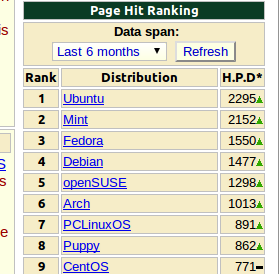
After years of thinking about it, I finally dumped Windows and installed Linux on my laptop (Lenovo Y410). In fact, I'm posting this from my Mint-powered laptop. I choose Linux Mint because of the good reviews I read prior to deciding what my chosen distro will be. Basically it is a fine-tuned Ubuntu. I was surprised to see that Mint is closing in on Ubuntu in terms of popularity according to Distrowatch.com's page hit ranking. The first time I looked at Mint (version 8), it is way behind Ubuntu. But now it is in 2nd place and it looks like it will overtake Ubuntu sooner or later. Why just now? Like I said, this is a plan that started brewing eons of years ago. I'm one of the proponents of Linux. I really  like to get rid of all Microsoft products in my system. But my job as a computer technician makes it impossible. Recent developments with my job is the indirect reason why I just switched now. I recently relocated here in Thailand (Bangkok). I arrived here Janua...

How to Display Adsense Ads Below the Blog Title in Blogger

Image
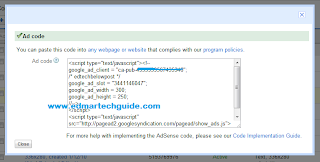
As you can see, I'm monetizing this blog by using Google Adsense. I get paid every time someone clicks an ad. The most effective ad placement for me is the one located under the blog title. I will post here the steps if you want to implement this on your site. Create your desired adsense ads and copy the code. Adsense Code 2. You will need to convert the code because blogger will not accept it. Use postable for that. A very friendly app written by Elliot Swan. Paste it in the box and click on "make it friendly". Don't close it yet, you will need the code later. postable - very handy app 3. Go to Blogger dashboard > click on Design > the Edit HTML. Put a check mark on Expand Widget Templates and search for  .  To do it faster, click on Ctrl+F on your keyboard and find it. 4. Now paste the code from postable above . If you want your adsense ad to float along with the post body, add this code before and after your adsense code:  Put your adse...

Site Redesign

After months of procrastination, I successfully implemented a redesign of this site. The old template is a little quirky and I used it for more than a year already. This time, I decided to use a simple blogger template, one with no bells and whistles because I don't want any incompatibilities to occur now and for the future. I find that the customized templates that are downloadable on the internet are sometimes untrustworthy. The makers usually put hidden codes that you will not notice if you don't inspect the code carefully. And if you find a clean template, you will have a problem sooner or later when blogger updated its design or algorithm. I'm not finish yet on my redesign project but so far I'm already quite satisfied with the results.  I have lot of things to add here. Social media marketing is getting bigger and bigger, and I want to optimize my site for that. I will still add some twitter/facebook/digg/etc gadgets on the sidebar. I'm thinking of adding a ...

Solution: Windows Live Error hr:0x80070643

This problems s eems to be something to do with (a) not having the messenger.msi file in the Installer folder and (b) perhaps not updating Windows Messenger first. This combination seem to fix the problem: 1. Make sure that there is a messenger.msi file in the C:\WINDOWS\Installer folder. 2. If it is not present use the 'Search' function of Windows by tapping F3 and search for the file on your Windows folder. 3. Copy the file into the C:\WINDOWS\Installer folder. 4. Fire up Windows Messenger and log in. 5. If there is a new version available, a message will prompt. Follow the onscreen instruction. 

How to Reset Canon MP760 - Waste Ink Tank Reset Procedure

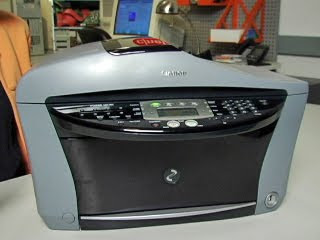
Problem with your Canon MP760 Waste Ink Tank? Just follow these steps on how to reset it. 1) Press the following keys in sequence: Copy-Menu-Scan-Copy-Scan. The display will say: SERVICE MODE #1 SSSW 2) Press the V key six times. The display will say: SERVICE MODE #7 PRINTER 3) Press OK. The display will say: #7 PRINTER #1 SSSW 4) Press the V key four times. The display will say: #7 PRINTER #5 INK ABS CAPA 5) Press OK. The display will say: SUCTION XX (where XX is how full the waste ink tank is as an integer percentage) 6) Change the XX to 0 by hitting the <> keys as many times as necessary (if you are closer to 99 than 0 it is better to hit the > key until it wraps around to 0). The display will say: SUCTION 0 7) Press OK. The display will momentarily say: SUCTION DATA ENTRY OK and then will quickly change to: #7 PRINTER #6 CDR ADJUST 8) Press the Stop/Reset button And the printer is back to normal.

How to Reset Canon MP780 - Waste Ink Tank Reset Procedure

1) Press the following keys in sequence: Copy-Menu-Scan-Copy-Scan. The display will say: SERVICE MODE #1 SSSW 2) Press the > key (also labeled +) six times. The display will say: SERVICE MODE #7 PRINTER 3) Press OK. The display will say: #7 PRINTER #1 SSSW 4) Press the > key (also labeled +) four times. The display will say: #7 PRINTER #5 INK ABS CAPA 5) Press OK. The display will say: SUCTION XX (where XX is how full the waste ink tank is as an integer percentage) 6) Change the XX to 0 by entering 0. The display will say: SUCTION 0 7) Press OK. The display will momentarily say: SUCTION DATA ENTRY OK and then will quickly change to: #7 PRINTER #6 CDR ADJUST 8) Press the Stop/Reset button And the printer is back to normal.

How to Disassemble Canon MP780/MP760 Printer to replace the Waste Ink Pads

Image
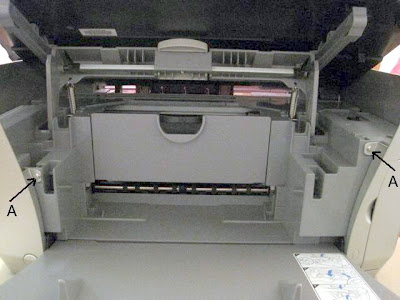
There are four different types of screws and you want to get them back where they came from. To help you keep the screws straight, I have labeled the photographs with letters corresponding to each screw type. Here are the screw types: A: medium length plastic screw. B: short machine screw with integrated washer. C: longer plastic screw with integrated washer. D: shorter plastic screw. Before you attempt this process, you should remove the cartridges, do a deep head cleaning followed by a nozzle check and repeat until nothing prints. Then remove the print head and unplug the printer with the carriage still in the center of the printer. You will need a medium Phillips screwdriver with a long shaft (at least five inches long). Start by removing the two side panels. First remove these two screws from the front of the printer: Canon MP 780 / MP 760 Disassembly Guide Remove these four screws from the rear of the printer: Now pry off the back of each side panel over the two...

How To Repair Canon Pixma MP780 / MP760 / MP730 - Clogged Purge Unit

Image
1) Open the cover to get at the ink tanks and when the carriage comes to the center pull the power plug on the printer, then move the printhead more to the left. 2) Have a syringe ready or an eye dropper with some Windex-Original with Amomnia D. Use a flash light to see into the right side of the open area where you can reach the ink Caps. These are the small rectangular suction units where the printhead sets all the way to the right. When the carriage is Parked, these ink caps come up and cover the inkjet nozzles. There is one on the left for the black and one on the right for the color. 3) Add several drops of Windex to each cap until they appear flooded. The windex should begin to absorb through the Caps and down through the purge tubes to the waste ink pads. If it all goes in, add a couple of more drops. 4) Plug the power back in and turn the printer on. The carriage will move through a couple of cycles and you should hear the purge unit doing a couple o...